Run Meta & Google ads straight to your project URL — same page captures the lead,
starts live chat, and fires conversion events back to your ad platform so campaigns
auto-optimise. WhatsApp-grade messaging, AI fallback agent, automated routing, complete CRM,
and a back-office for admins, managers, agents, and QA — all in one self-hostable
.NET application.
80+
Features
4
User Roles
1M+
Chats Scale
<100ms
Real-time Delivery
What is it?
One platform. Every customer conversation.
OnlineChatCRM is a complete live-chat and CRM platform that combines real-time messaging,
AI fallback agents, automatic lead routing, a fully-featured back-office, multi-project
branding, and an embeddable widget for any third-party website — all in a single
self-hostable application backed by SQL Server.
Multi-channel live chat
Visitors open chat from a standalone page /p/{slug} or via an embeddable widget on any external site — both share the same conversation backend.
Multi-project tenanting
Run unlimited brands from one install. Each project has its own slug, branding, accent colour, welcome message, allowed embed domains and AI instructions.
Four-tier role model
Admin, Manager, Agent, and Quality Analyst — each with a tailored console and permission scope. Agents have independent Live Chat & CRM toggles.
AI agent with smart handoff
Optional virtual agent answers when no human is online and explicitly escalates to humans on demand. Per-project system prompt; respects 24/7 availability rules.
Round-robin auto-assignment
Queued chats route to available agents using a sticky round-robin index. Each agent has independent active & offline chat limits. Manual reassign on demand.
Built-in reporting
Chats, Chat data, User data, User analysis, CRM reports — all paginated, date-/agent-/stage-filterable, exportable as CSV. Single-click PDF transcript per chat.
PWA + system notifications
Installable on desktop & mobile. Agents receive system notifications, sound pings, and a numeric app-icon badge even when the dashboard tab is backgrounded.
Lead automation
Every chat becomes a lead with full UTM + device + geo attribution. Auto qualification rules, lead-stage workflow, follow-up scheduling, per-lead note trail.
Block abusive visitors
Admin or manager bans a visitor by IP in one click. Future chat-start attempts from that IP return 403 silently. Captured at first chat start, audit-trailed.
What sets it apart
Engineered for the long tail
Most platforms get the demo right and the long-tail wrong. These are the details that
matter once you cross 10,000 conversations.
01
WhatsApp-style read receipts
Single ✓ (sent), double ✓✓ (delivered), double ✓✓ in green (read). Updates live without anyone refreshing.
02
Bidirectional typing indicators
Visitor sees the support pill the second the agent types; agent sees the same pill the second the visitor starts typing. Both directions, real-time.
03
15-second visitor offline grace
Brief tab switches and network blips don't flicker the agent UI — the chat stays in the Active bucket for 15s before the system marks it offline.
04
30-second agent refresh grace
An agent refreshing their browser doesn't lose their chats — reassignment fires only after 30s of disconnect, so a refresh or network blip is invisible.
05
Lazy message history
Long chats load the last 30 messages instantly; older ones stream in as the agent scrolls up. Chats with 50,000 messages still open in < 1 second.
06
Infinite-scroll inbox
Initial load shows 20 chats per bucket; the rest stream in as the agent scrolls. Active / Offline / Closed / Unassigned / Others — same pattern for all.
07
AI human-disguise
1-second delay before the AI shows the typing pill. Auto-marks the visitor's previous messages as read the moment AI starts composing — just like a human.
08
App-icon badge
Installed PWA shows a numeric badge on the home-screen icon, dock, or taskbar when there are unread chats. Cleared automatically when unread hits zero.
09
One-click IP ban
Block abusive visitors from the chat modal in one click. The IP is captured at first chat start; future chat attempts from that IP return 403 silently.
10
Auto cookie / cache hygiene
Staff browsers self-prune oversized localStorage and orphan entries every 30 min. Visitor side is intentionally never touched (session-critical data).
11
One-click PDF transcripts
Download any conversation as a multi-page PDF from the Chat data table. Colour-coded by sender, with timestamps and attachment links.
12
Real activity sort
The Updated column shows the actual last-message time, not when someone clicked the row. Opening a chat or changing a lead stage no longer disturbs sort order.
13
Agent permission split
Live Chat and CRM Leads are independent toggles per agent. Build a chat-only team, a CRM-only team, or both — without giving the wrong access.
14
Per-project AI personality
Each project has its own AI system prompt. E-commerce, healthcare, and finance brands get totally different bot behaviour from one install.
15
Server-paginated everything
Every report — chats, leads, user data, analysis — paginates server-side. Browser never receives more rows than the visible page. Scales to lakhs of rows.
For your customers
Visitor Experience
Two front-ends: a standalone branded page at /p/{slug} and an embeddable widget.
Both share the same conversation backend and per-project branding.
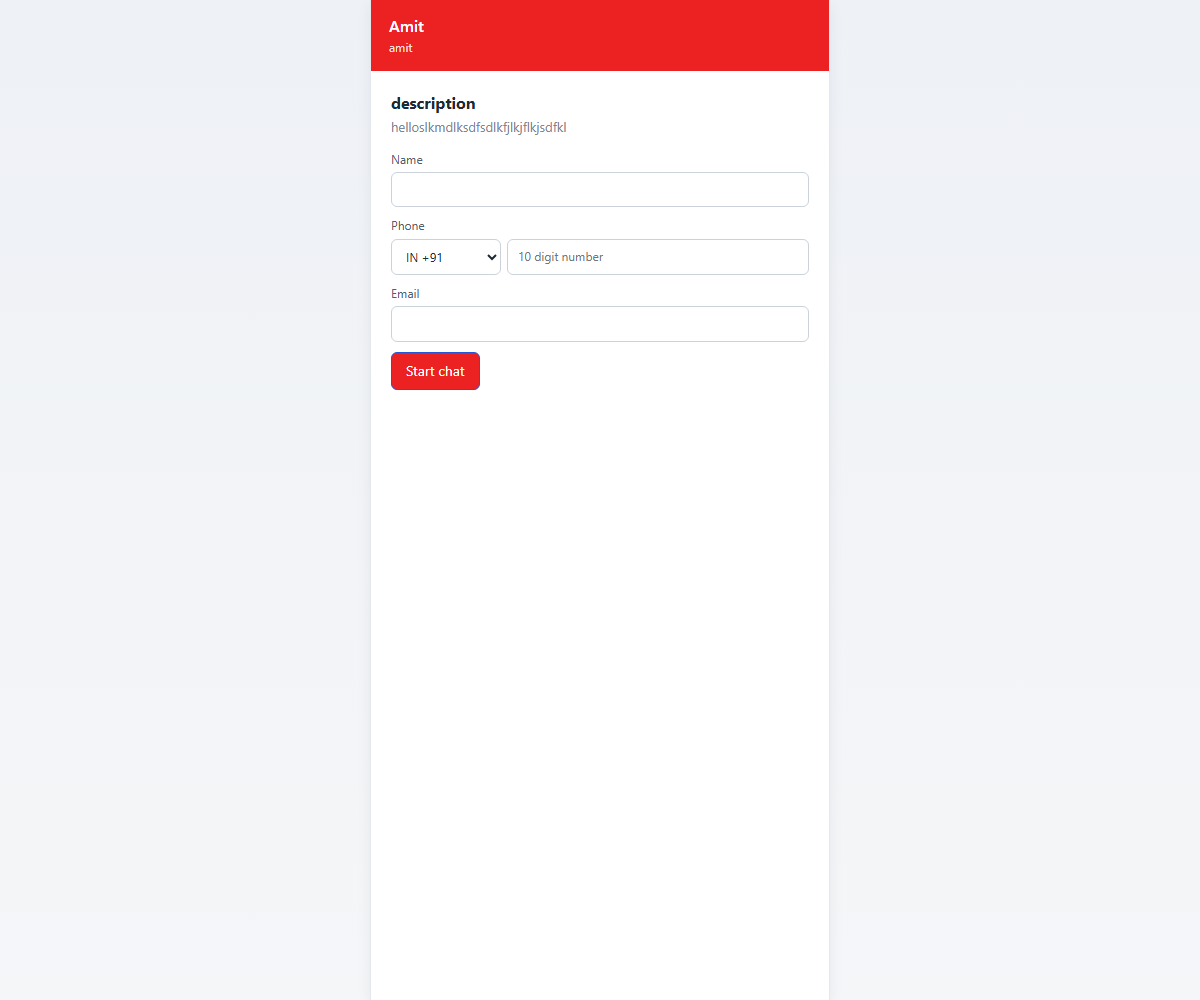
Visitor page — standalone branded chat page at /p/{slug} with per-project header colour, welcome heading, and contact form.
Per-project branding
Each project picks its own title, subtitle, accent colour, welcome message, contact-form heading, contact-form description, and favicon/icon — all editable from the admin Projects tab.
Visitor uploads an image with live preview before sending; agents receive it as a thumbnail bubble with full-resolution click-through. Lazy-loaded to keep history fast.
Click reply on any message and the composer shows a quoted preview. Click a quote bubble to scroll back to the original message; the original briefly highlights so the visitor finds it instantly.
Click-to-scrollLive-updates
Installable PWA
"Add to home screen" prompt for mobile / Chrome; iOS Safari instructions are auto-detected. Theme colour, manifest, service worker — full PWA stack so the chat behaves like a native app.
iOSAndroidDesktop Chrome
Source & intent capture
Every chat automatically captures: source domain, referrer, landing URL, UTM source/medium/campaign, device type, OS & version, browser & version, language, connection type, geo city/region/country, time on page, and returning-visitor flag. Available in the User analysis report.
UTMDeviceBrowserGeoReturning visitorTime on page
Cross-session resume
A project-scoped cookie + localStorage token persists across browser sessions. Visitor returns and the conversation continues exactly where it ended — regardless of how many months later. Tokens are project-isolated so the same browser visiting two of your projects keeps each conversation separate.
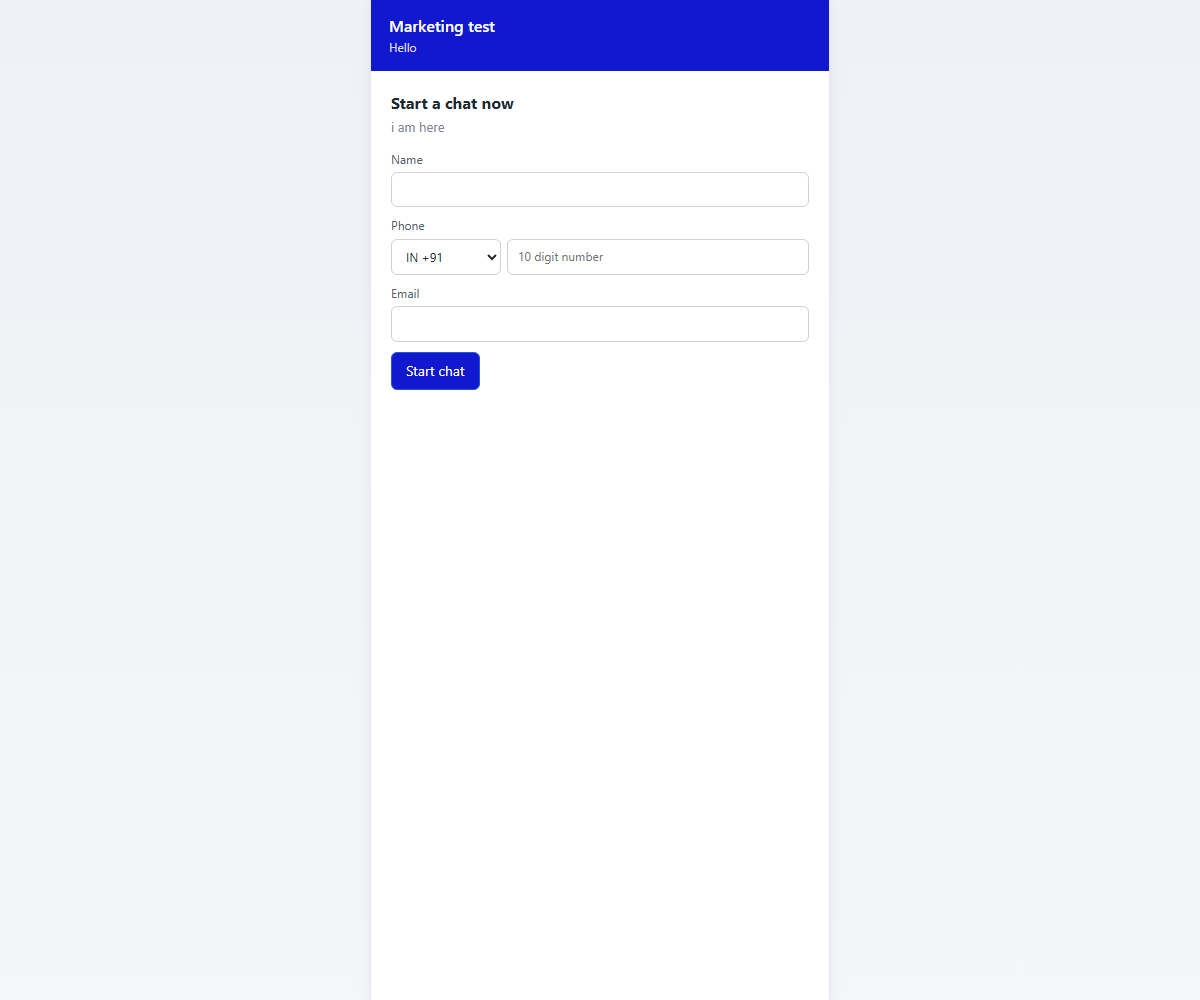
Another project, same backend — this project (slug rahul) uses a different accent colour, welcome heading, and contact-form copy. Backend code is identical.
Drop-in for any site
Embeddable Chat Widget
A 60 KB script that opens a Shadow-DOM-isolated chat bubble on any third-party website.
Same backend, same per-project branding, same features as the standalone page.
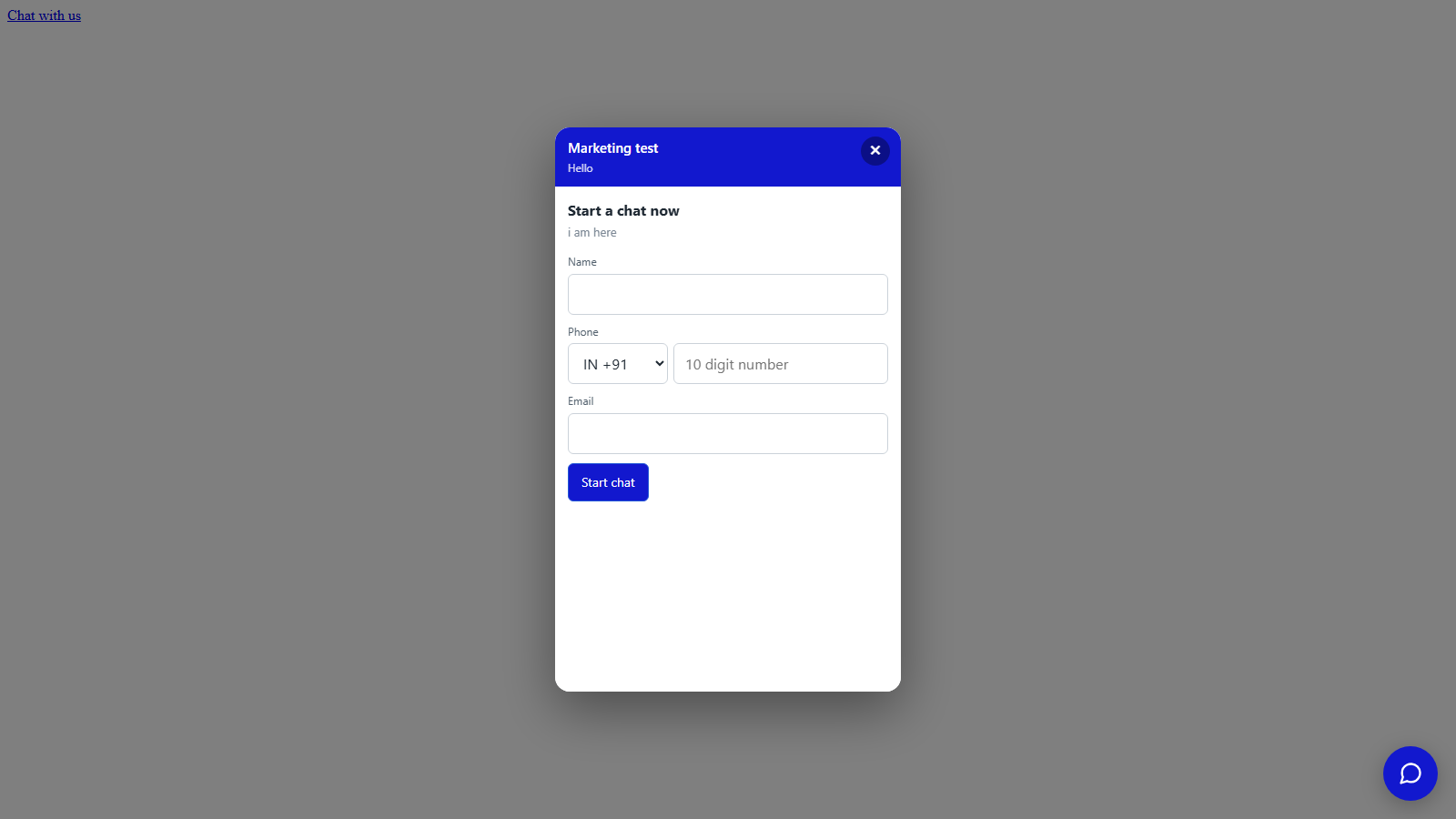
Embedded widget on a third-party page — bubble bottom-right, full chat panel on click.
Standard embed
One-line script tag
Drop a single async script before </body> and the widget is live.
Add data-cp-open to a link / button anywhere on the page.
<a href="#" data-cp-open>
  Chat with us
</a>
Popup modal
Auto-open on page load
Centred iframe popup throttled to once per 7 hours per browser via localStorage. The throttle key is project-scoped so different projects can coexist on the same site.
CORS controlled
Allowed embed domains
Each project has its own domain whitelist. Wildcard subdomains supported (https://*.client.com). Changes apply within ~30 seconds, no restart needed.
Widget features at a glance
Shadow DOM isolation
Customer-site CSS can't bleed into the widget. Widget CSS can't bleed out. Always pixel-perfect.
Position config
Bubble can sit bottom-right or bottom-left per project setting. Customised via the embed tag's data-position attribute.
Unread badge
Red counter on the bubble when chats arrive while the widget is closed. Resets the moment the visitor opens the panel.
Lazy chat history
Returning visitor sees last 30 messages instantly; older messages load on scroll-up — just like WhatsApp Web.
Get the right agent on the right chat
Routing & Auto-Assignment
Smart routing rules decide whether a new chat goes to a human, the AI, or sits in the
queue — based on availability, agent load, and a fair round-robin rotation.
Round-robin auto-assignment
When a visitor starts a chat, the server picks the next eligible agent using a persistent counter (so the rotation survives restarts). "Eligible" means: online + live-chat-enabled + not on break + below their active-chat limit + not assigned a duplicate by phone number.
Persistent counterSkip-if-overloadedPhone-dedup
Drain queue on agent online
The moment an agent comes online, the server drains the pending queue and assigns waiting chats to them — honouring all the same eligibility rules. No chat sits in queue when capacity exists.
Active and offline chat limits
Each agent has two independent limits: how many active chats they can hold at once (e.g. 3), and how many offline chats they can keep parked in their inbox for follow-up later (e.g. 5). Set per-agent in the Agents tab.
Per-agent limitsOverflow falls back to queue
Visitor offline sweeper
If a visitor disconnects and doesn't return within 15 seconds, the chat moves from Active to Offline. The original agent keeps it (so they can resume), unless they're offline themselves or over their offline limit — in which case it returns to the queue.
15s thresholdBackground sweeperAuto-reassign on overflow
Manual reassign by agent
An agent can hand their own chat off to another currently-online live-chat-capable agent in one click. The server validates the target is online, not on break, and not at their cap before accepting.
One-click handoffTarget validation
Manual assign by admin / manager
From the Chats modal an admin or manager picks any agent and assigns the chat. The selected agent is added to the chat instantly and notified via SignalR.
From Chats modalLive SignalR push
Agent inactivity sweeper
Background service logs out agents whose session hasn't been touched in 5+ minutes while holding open chats. Prevents zombie agents holding chats hostage. Bumped by a heartbeat ping so a reading agent isn't kicked.
On-break toggle
An agent on break gets no new chats — but keeps the ones they already have. Toggle on / off in one click. Useful for short pauses without losing context.
A chat's full journey
Chat Lifecycle & Status Buckets
Every chat moves through a clean state machine. Status changes happen automatically based on
visitor and agent activity, so agents always see the right chats in the right bucket. No manual
bookkeeping needed.
1. Queued (Unassigned)
When a visitor starts a new chat and no agent has been auto-assigned yet, the chat sits in Unassigned. Shows up in every agent's "Unassigned" tab so anyone can pick it up. Also auto-assigned via round-robin the moment an eligible agent becomes available.
Visible to all agentsAuto round-robinPickable manually
2. Active (Open + Visitor Online)
Once a chat is assigned to an agent and the visitor is currently on the page, it sits in the agent's Active bucket. This is where live conversations happen. Live typing, instant message delivery, read receipts — all working in real-time.
Live typingRead receiptsReal-time
3. Offline (Visitor Disconnected)
If the visitor closes their tab, switches to a different app, or loses internet, the chat goes into the agent's Offline bucket after a 15-second grace window. The grace stops minor tab-switches from flickering the status. The chat stays parked with the original agent so they can reply when the visitor returns; the visitor's next message wakes it back up to Active automatically.
15-second graceChat parked, not closedAuto-wake on return
4. Closed
An agent or admin explicitly clicks Close on a chat when the conversation is genuinely finished. The chat moves to the Closed bucket. Status flips to "closed" and the visitor sees a small "this chat has ended" banner. If the same visitor sends a new message later, a fresh chat is started instead of resuming the closed one.
Explicit closeVisitor bannerFresh chat on return
5. Reassigned to Queue
If the assigned agent goes offline for more than 30 seconds and their offline-chat limit is full, the system automatically releases the chat back to the queue. The next available agent picks it up via round-robin. Visitor doesn't wait alone.
30-second agent graceAuto-release on overflow
6. Others (View-Only)
The Others bucket shows chats assigned to other agents. Read-only for the viewer. Useful when an agent needs to peek at a teammate's chat for handoff context, but cannot reply. Lead-stage and notes are still visible.
Bucket count badges
Each bucket in the agent's sidebar shows a live count + a red unread badge. The total unread
across all buckets also appears in the browser tab title (so "Agent Console" becomes
"(3) Agent Console") — agents notice incoming chats even when they're on a different tab.
Where the work happens
Agent Console
An inbox-style dashboard purpose-built for agents handling hundreds of conversations per day.
Agent inbox with chat detail open
Show the bucket toggles, a chat list with unread badges, and a chat detail open on the right with the composer.
screenshots/agent-inbox.png
Five-bucket inbox
Active (live chats with the visitor present), Offline (visitor disconnected, chat parked with this agent), Closed (chat explicitly ended), Unassigned (queued, waiting for any human), Others (assigned to other agents — read-only). Each bucket has its own infinite-scroll backfill, search, and unread badge count.
ActiveOfflineClosedUnassignedOthers
Per-bucket search
Search by visitor name or phone number, debounced. Autofill is actively suppressed on staff search inputs so saved-login data never accidentally appears.
Starred chats
Each agent can star important chats. Stars are per-agent — the same chat can be starred by one agent and not another. Persists server-side across devices and reloads.
Quick replies
Each agent saves up to 5 canned replies. Click the lightning icon in the composer to pop the picker; clicking a reply pastes it into the textarea for review-and-edit before send. Saved server-side, sync across browsers.
One-click reassign to another agent
Hand a chat off to a teammate with a single click. Server validates the target is online, eligible (Live Chat permission), not on break, and below their active-chat limit. Conversation history is preserved.
On-break toggle
Visible online but not eligible for new chats. Existing chats stay assigned. One click on / off.
Lead-stage tagging inline
Mark a lead as New, Qualified, Not Qualified, or Converted right from the chat detail. The tag immediately appears in CRM reports and the admin Chats list.
NewQualifiedNot QualifiedConverted
System notifications + sounds
Triggered on: new assignment, new visitor message in an assigned chat, and new message arriving while the agent's tab is backgrounded. Uses the service worker so backgrounded PWAs still ring.
New assignmentNew messagePWA badgeSound
Session heartbeat
Browser pings /api/agent/heartbeat in the background so reading a long visitor message doesn't trip the inactivity sweeper. Resolves the "got logged out mid-chat" complaint other CRMs have.
CRM tab (if permitted)
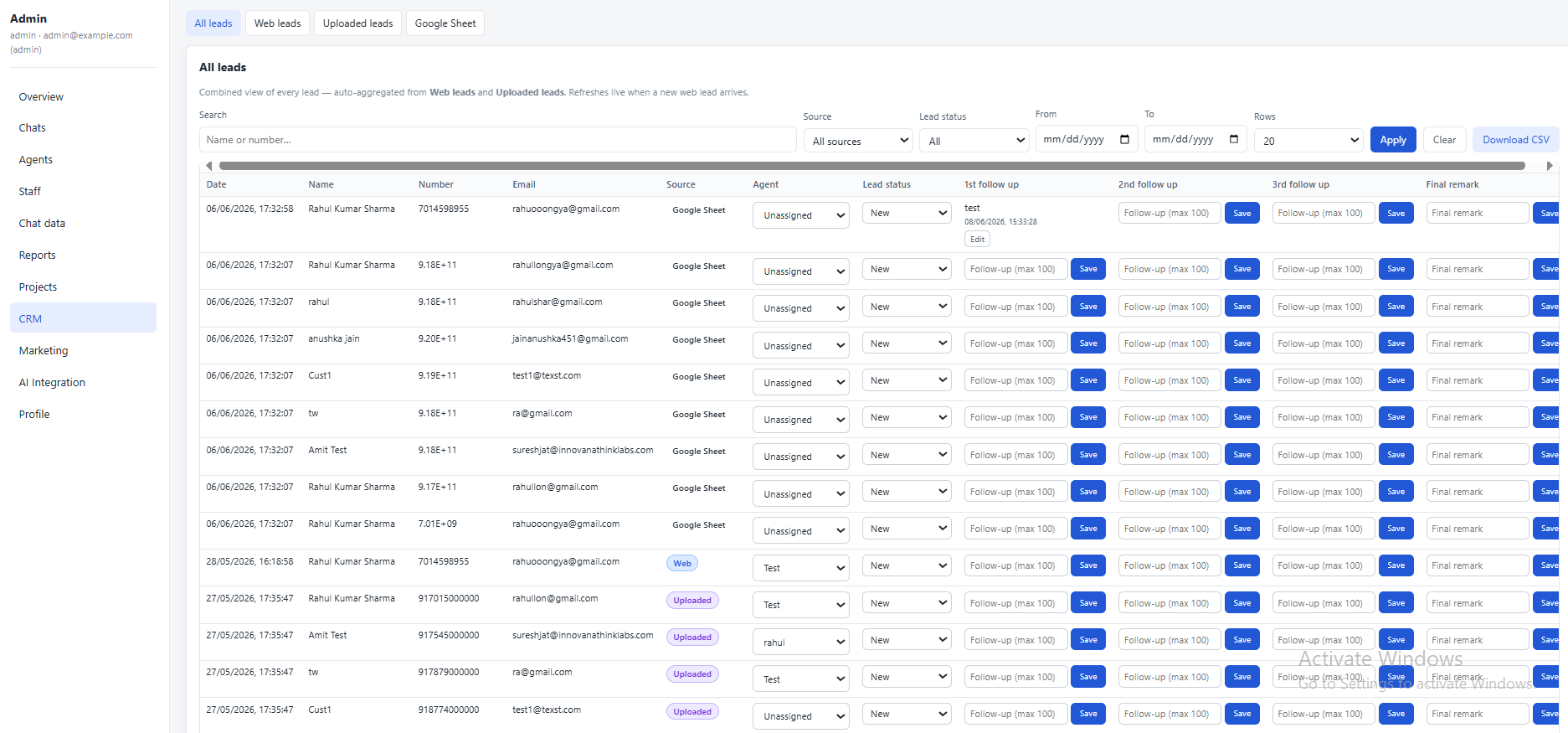
Agents with the CRM Leads permission see All leads, Web leads, Uploaded leads, Google Sheet leads — with lead-stage selectors, follow-up date inputs, and final-remark fields. Permission is independent of the Live Chat permission.
Run the operation
Admin Dashboard
Full visibility and control over chats, agents, staff, projects, CRM, AI, and reports.
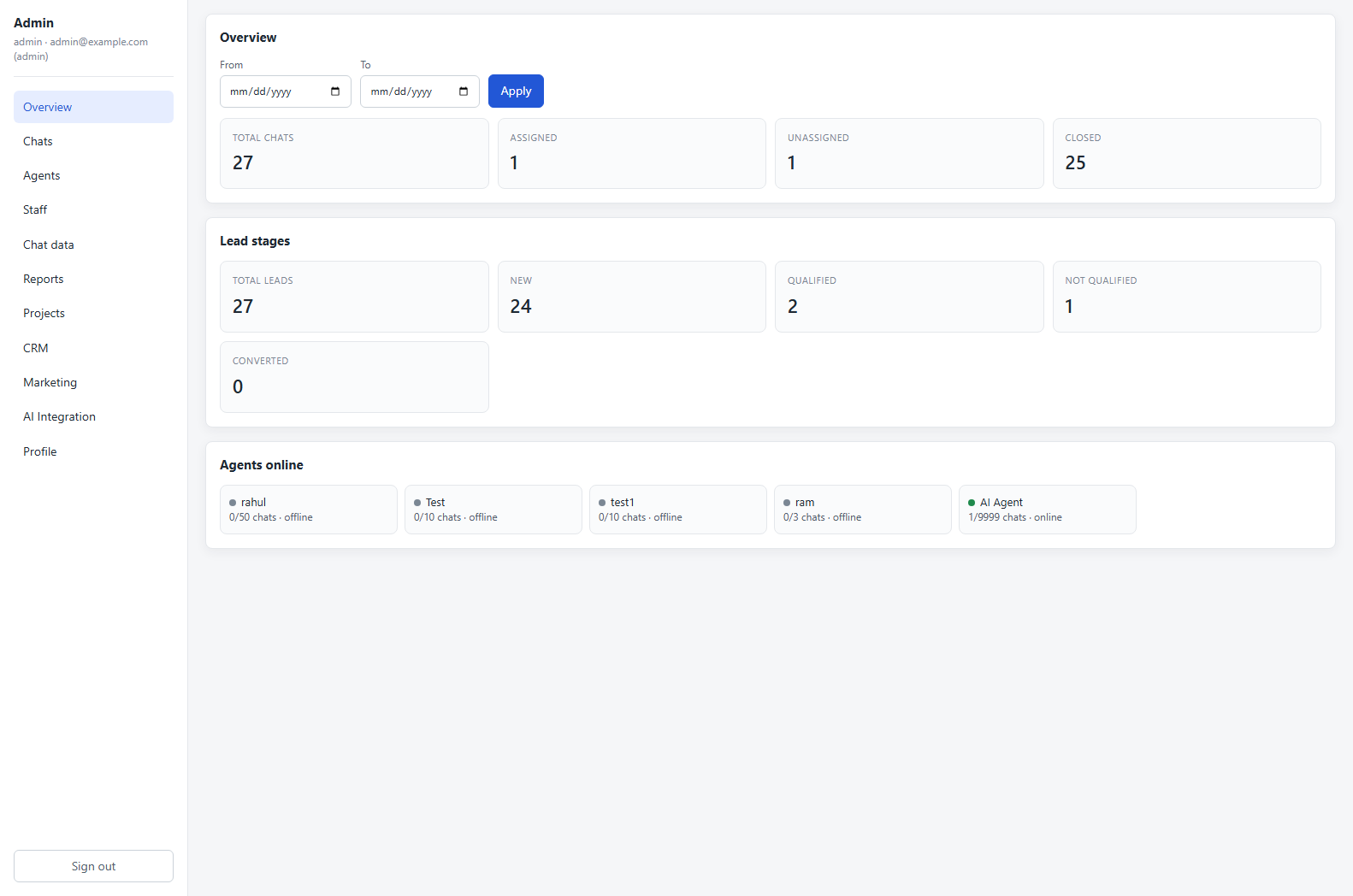
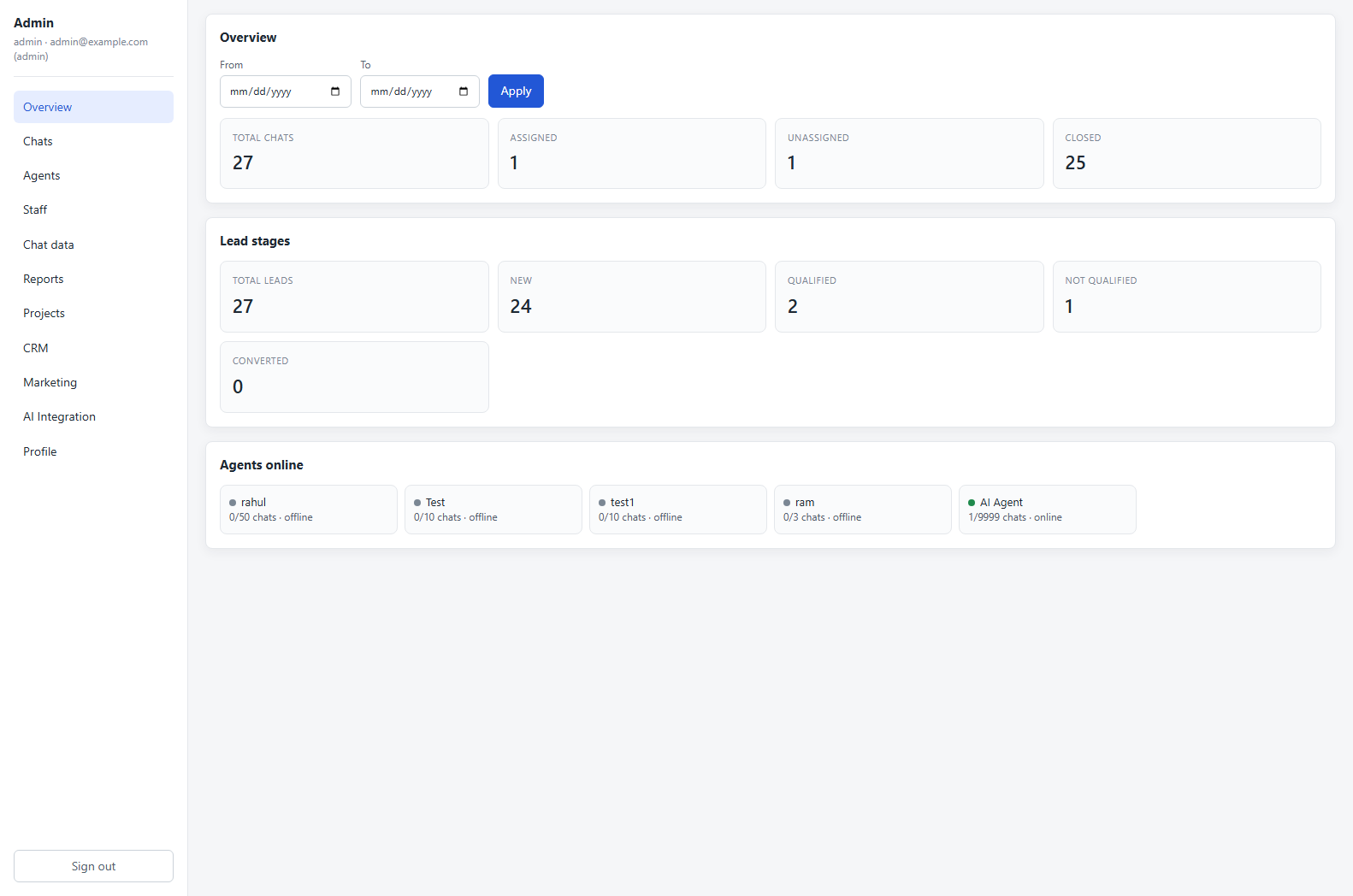
Admin Overview — live totals (chats, leads, lead stages) and an agents-online grid with current load per agent.
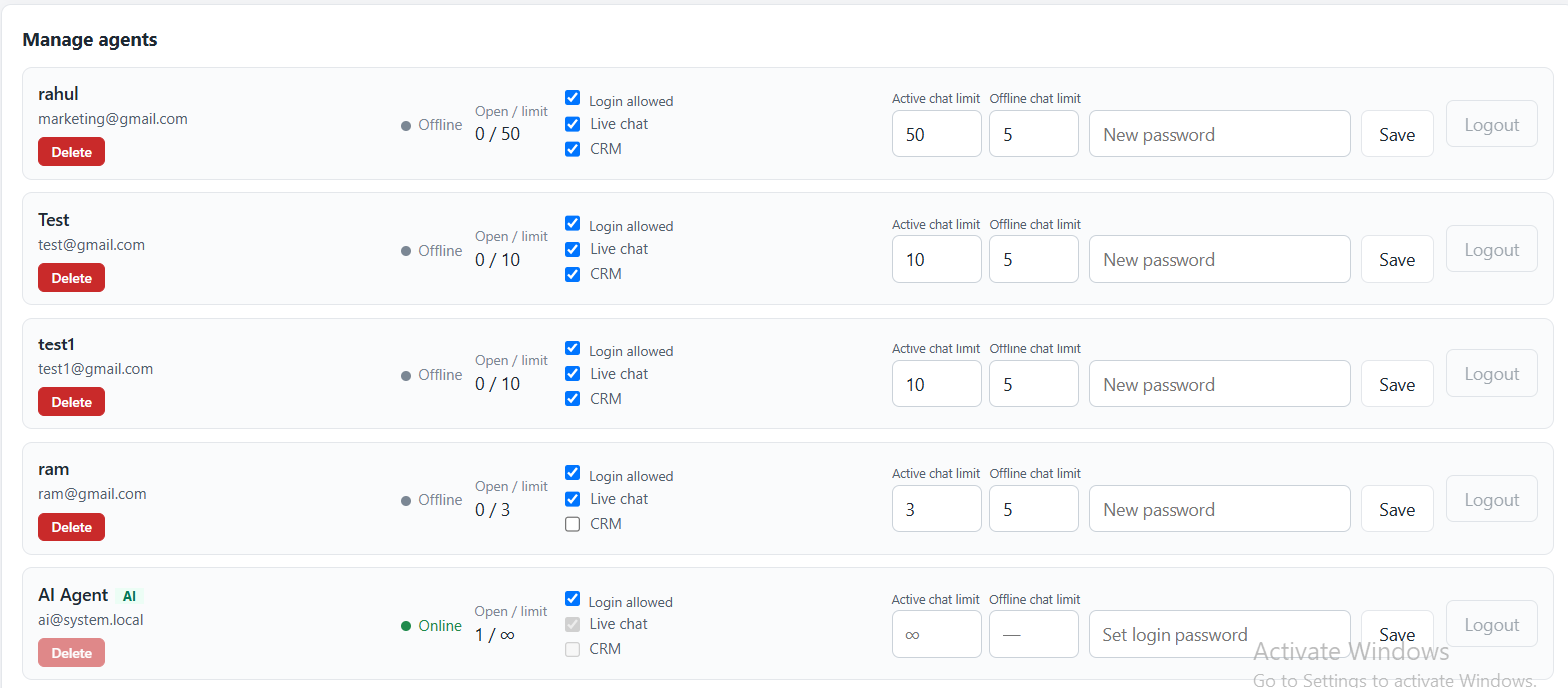
Add new agent. Name, email, password, active chat limit, offline chat limit, plus Live Chat / CRM permission toggles. Manage existing agents below.
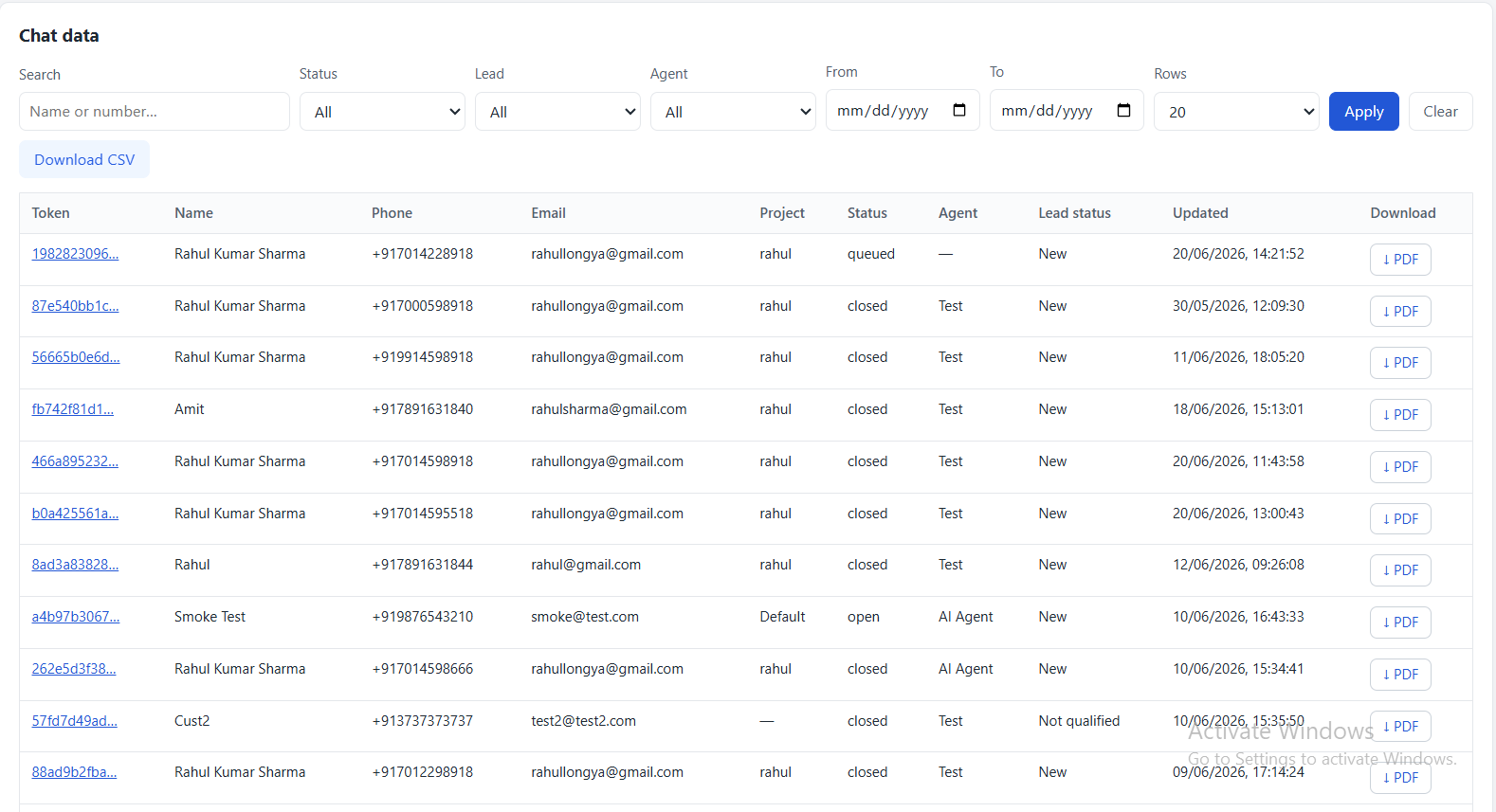
Chat data report with the one-click PDF download column on the far right. Date / status / agent / lead-stage filters above; pagination below.
Marketing — User Data report. Visitor name, phone, email, project, source domain, referrer, UTM source / medium / campaign, first-seen time. Paginated, CSV exportable.
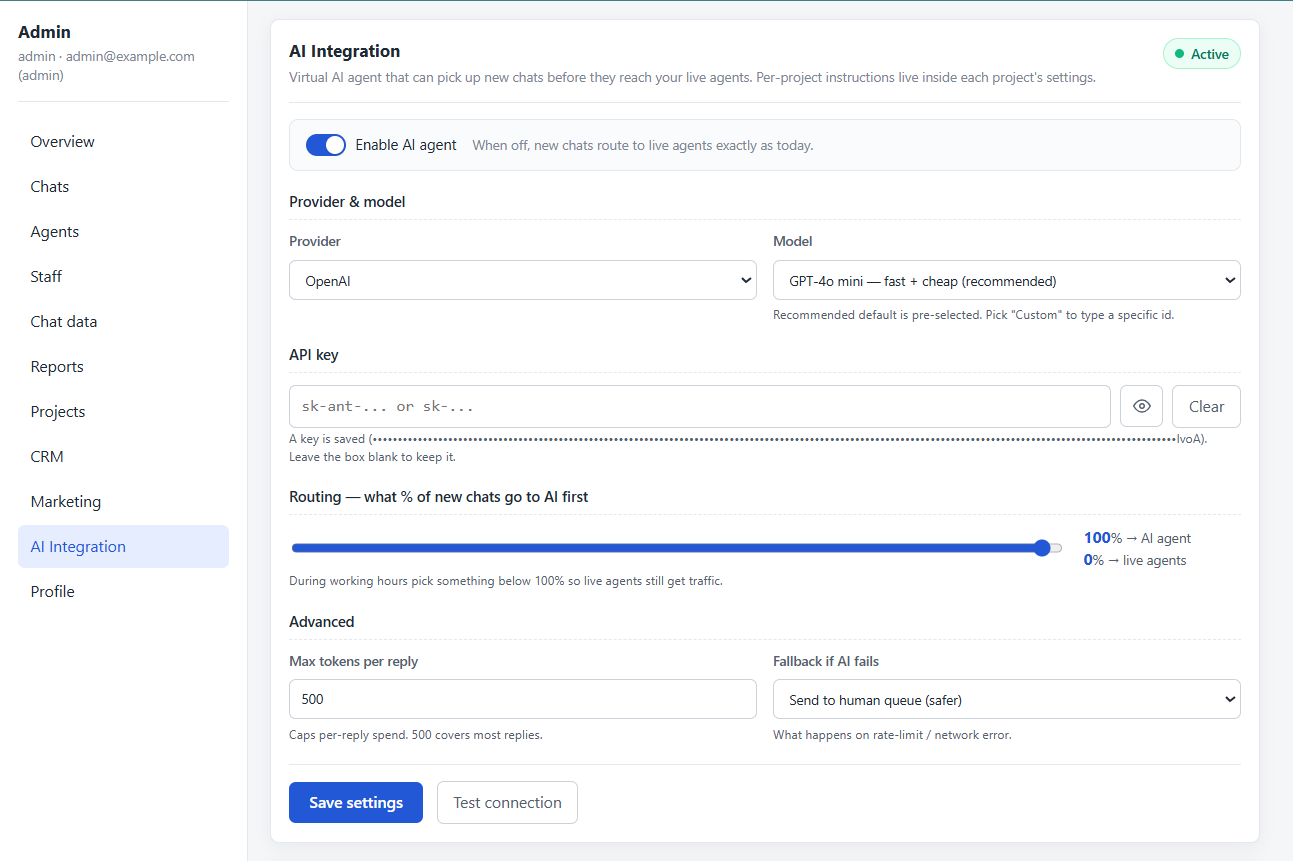
AI Integration page. Provider toggle (Claude / OpenAI), model picker, max tokens per reply, system prompt template, fallback rules. Master enable / disable at the top.
CRM — All Leads. Every chat-, web-, CSV-, or sheet-derived lead in one paginated table with inline lead-stage selector, follow-up date input, and final-remark field.
Overview snapshot
Total chats by status, lead-stage breakdown, live agent presence with load. Date-filtered.
Chats
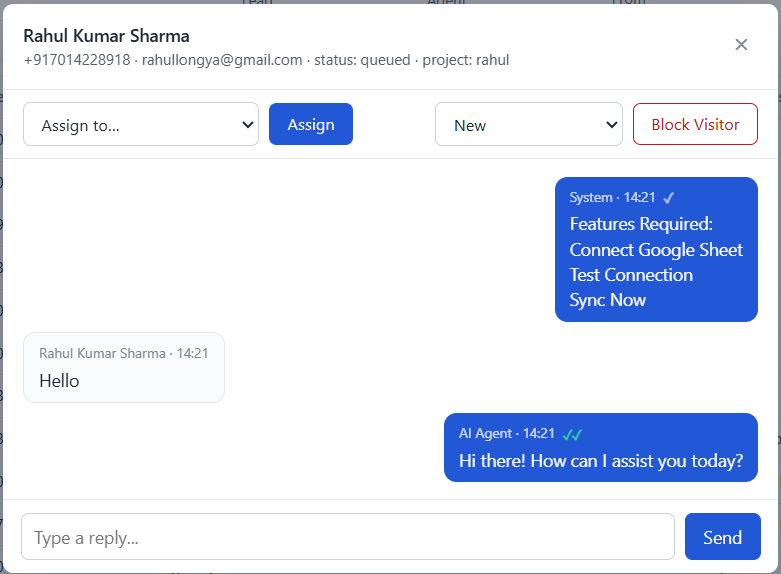
Every conversation in one paginated table. Filter by All / Assigned / Unassigned / Offline / Closed. Click any row to open the chat modal with Assign / Lead Stage / Block Visitor toolbar plus reply composer.
Assign / reassign to any agent
Set lead stage
Block visitor IP
Reply directly from the modal
Agents
Add agents, set active & offline chat limits, toggle Live Chat / CRM permissions, force-logout, edit display name, reset password.
Staff
Manage admins, managers, and quality analysts. Role-aware editing (managers can't promote anyone to admin). Last-admin protection — can't demote the only remaining admin.
Chat data
Detailed per-chat report with Token, Name, Phone, Email, Project, Status, Agent, Lead stage, Updated (= last message time), and a one-click PDF Download column.
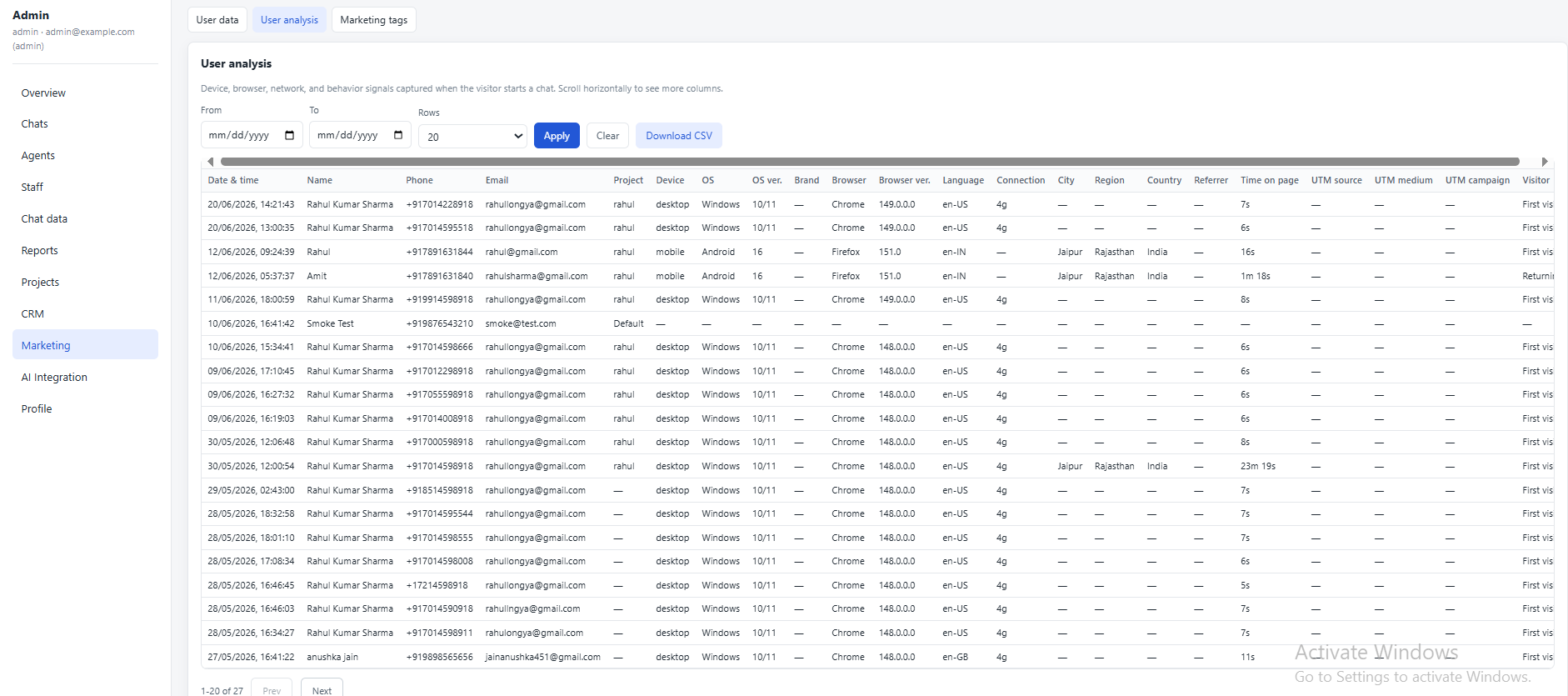
User data + User analysis reports (UTM, device, geo) with date filters and CSV export. Marketing Tags surface for GTM / GA4 / Meta Pixel snippets injected site-wide.
AI Integration
Provider (Claude / OpenAI), model, max tokens per reply, system prompt template, fallback rules, escalation policy. Master enable / disable toggle. Per-project AI instructions live inside the Projects tab.
Server-paginated everywhere. Every table in the admin — Chats, Chat data,
User data, User analysis, All Leads, Web Leads, Uploaded Leads, Google Sheet Leads —
paginates server-side with a per-table rows selector (20 / 50 / 100), Prev / Next, and
an "X-Y of Z" indicator. No infinite DOM lists eating browser memory.
A trimmed-down admin
Manager Console
Managers see almost everything admins see — minus Projects and AI Integration. A team-lead
view with full operational visibility but no infrastructure access.
Capability
Admin
Manager
Agent
QA
View all chats & reports
Yes
Yes
Own only
Read-only
Assign & reassign agents
Yes
Yes
Own to others
No
Mark lead stage
Yes
Yes
Own chats
No
Block visitor by IP
Yes
Yes
No
No
Download chat PDF
Yes
Yes
No
No
Manage agents (add / edit / force-logout)
Yes
Yes
No
No
Manage staff (admins / managers / QA)
Yes
No admin promote
No
No
Edit Projects (branding, slug, embeds)
Yes
No
No
No
Edit AI configuration
Yes
No
No
No
Edit DB / global config
Yes
No
No
No
Server-side enforced. Hidden UI buttons aren't enough — every endpoint
independently checks the actor's role server-side. A manipulated request can't bypass
restrictions.
Quality oversight
Quality Analyst Console
A dedicated read-only console for QA reviewers — see every chat in real-time, but never
send a message or change state.
Live chat monitoring
Every conversation update streams to QA in real-time via SignalR — new messages, typing pills, receipts, agent presence.
Filter by agent & status
Drill into a single agent's work or focus on offline / closed reviews. The AI shows as a virtual "AI" filter so QA can isolate bot-handled chats for grading.
Full history with lazy load
Long chats open in 30 messages and stream the rest on scroll-up — same UX as agents.
Total chat control
Chat Management
From the Chats modal, an admin or manager has every lever they need on a single chat.
Chat history modal. Visitor info on top · Assign agent / Lead stage / Block Visitor toolbar · full chat thread below · reply composer at the bottom.
Lead-stage tagging
Mark New / Qualified / Not Qualified / Converted from the modal dropdown. Change is immediate and flows into CRM reports. Admin / manager / agent on assigned chats / QA — all four can mark, with role-aware authorisation.
NewQualifiedNot QualifiedConverted
Manual agent assignment
Pick any agent from the dropdown and click Assign. The new agent is added to the conversation group, joins the chat's SignalR room, and receives the conversation history — no refresh needed on their side.
One-clickLive SignalR push
Block visitor (IP ban)
One click on Block Visitor: the source IP (captured at first chat start) is added to BlockedVisitors, the current chat is closed, and future chat-start attempts from that IP return a generic 403. Reason and operator are recorded for audit.
IP banAudit trailAuto-close current chat
One-click PDF transcript
From the Chat data table, click the PDF button on any row to download the full conversation as a multi-page PDF. Header shows visitor info + project + status + agent + lead stage; body shows every message colour-coded by sender with timestamps and attachment links.
QuestPDFPer-conversationMulti-page
Close chat
Explicitly close a chat from the modal — status flips to Closed, conversation moves out of the agent's Active bucket, and the visitor sees a "this chat has ended" banner. Re-engagement still creates a new chat (or resumes the closed one if the visitor returns and types).
Reply from the modal
Admins and managers can reply to a visitor directly from the chat-history modal — their reply appears as a "from-admin" bubble (distinguishable from agent bubbles in the visitor's chat).
From chat to closed deal
CRM & Lead Management
Every conversation automatically becomes a lead. Multiple ingestion sources flow into a
unified inbox, with lead-stage workflow, follow-up scheduling, and notes.
Four lead sources
All conversations (every chat is a lead), Web leads (public POST endpoint for landing-page forms), Uploaded leads (CSV upload from admin), and Google Sheet leads (background poller pulls from configured sheets every 60s). Each source is tracked separately and rolled up in the unified view.
ChatsWeb formsCSV uploadsGoogle Sheets
Lead-stage workflow
Four stages: New, Qualified, Not Qualified, Converted. Every lead starts as New; any operator with the right permission can move it forward. Stage filters across every CRM report.
NewQualifiedNot QualifiedConverted
Follow-up scheduling
Each lead carries a follow-up date and a remark. Agents see "due today" leads surfaced on their dashboard so nothing slips. Date pickers are inline in the CRM tables.
Per-lead notes
Append-only note trail per lead — every agent interaction is attributable. Final remarks are separately editable. Notes are timestamped and operator-tagged.
Google Sheets sync
Background poller pulls leads from configured Google Sheet sources every 60s (interval is configurable per source). Uses a service account so there's no per-user OAuth dance.
Permission-scoped CRM
Agents toggled off "CRM Leads" never see the tab; agents toggled off "Live Chat" never see the inbox. Run a chat-only team or a CRM-only team if that fits your structure.
Lead attribution
Each chat-derived lead carries the full marketing capture: UTM source / medium / campaign, referrer, landing URL, source domain, geo, device, browser, returning-visitor flag. Available in the User analysis report and in the lead's own row.
Always-on first responder
AI Agent
An optional virtual agent that picks up chats when humans aren't available — and quietly
gets out of the way the moment a human is.
Choose your AI provider
Pick from Anthropic Claude (recommended) or OpenAI. Choose a model from a clean dropdown
list or type a custom model ID. Set how many tokens the AI can use per reply. Everything
is done from a friendly admin screen — no JSON editing, no config files.
Anthropic ClaudeOpenAICustom model id
Different AI personality per project
Every project has its own system prompt. So your e-commerce store can have a friendly
shopping assistant, your medical practice can have a careful health helper, and your
finance brand can have a formal advisor — all from a single install, with one prompt
box per project.
Feels like a real human typing
The AI doesn't reply instantly — that would give it away. Instead, the moment a visitor
sends a message, the AI waits 1 second, then shows the "Support is typing…" pulsing
pill bubble in the visitor's chat. While the pill is showing, the AI is actually composing
its reply. The reply lands and the typing pill disappears — just like a real agent who
read the message, thought for a moment, and started typing back.
1-second pause before typing pillPulsing typing indicatorNatural reply timing
Auto green ticks — just like a human
Real agents open the chat, read the message, then reply. Visitor sees two green ticks
(read receipt) right before the reply lands. The AI copies this exactly — the moment it
starts composing, the visitor's previous unread messages flip to green double-tick "read"
status. So when the AI reply finally arrives, the visitor sees the same natural sequence:
delivered → read → reply. No "single tick still unread" tell that screams "bot".
Single tick → double green tickBefore the AI reply, not after
AI knows when to call a human
The AI can decide that a question is too complex, too sensitive, or out of scope —
and explicitly say "I need to bring in a teammate". When that happens, the chat
immediately moves to the human queue and is permanently flagged so the bot
never tries to take it back, even if all humans go offline. The visitor gets the same
smooth handover they'd get from one human to another.
Safety net — falls back to a human if AI fails
If the AI provider has a problem — rate limit, auth error, network blip — the chat
transparently moves to a human agent per your configured rules. Visitor doesn't see an
error; they just notice that "support" is replying instead of the bot. Zero customer pain
even when the AI provider is having a bad day.
One master switch
Single toggle in the AI Integration page turns the entire AI agent on or off. When off,
every chat routes to live agents exactly as if the AI never existed. Useful for testing,
or for putting the AI on pause without losing your configuration.
AI in the QA agent filter
The Quality Analyst console treats the AI like any other agent — you can filter chats
by "AI Agent" in the agent dropdown. QA can then audit AI-handled chats separately and
grade them, helping you continually improve the system prompt.
Under the hood
Real-time Engine
Built on SignalR. Every event — new message, typing, receipts, presence, inbox change,
AI status — flows through the same hub with strict per-side authorisation.
SignalR hub
A single ChatHub serves visitor, agent, admin, and QA connections. Each role joins its own group with strict authorisation on every method.
Authorized JoinConversation
Visitors can only join their own conversation group. Agents only chats assigned to them. Admins / QA — any conversation. Silent denial if unauthorised.
Auto-reconnect
Network blips reconnect automatically. After reconnect the client re-joins the currently-open conversation group so live ticks & typing resume without refresh.
Multi-window aware
An agent can open multiple tabs — presence aggregates by connection set. Closing one tab doesn't mark them offline.
Targeted broadcasts
Receipts, typing, and message events broadcast to only the relevant groups — not every connected client. Keeps the wire small.
Backplane ready
Single-instance today, designed to extend with Redis backplane when horizontally scaling.
WhatsApp-grade UX
Receipts & Typing Indicators
Both directions. Real-time. No refresh.
Sent
Message persisted server-side. Single tick on the sender's bubble.
Delivered
Recipient's connection received the SignalR broadcast. Double tick, grey.
Read
Recipient's tab is focused and they opened the chat. Double tick, green.
Typing indicators
Visitor → agent
The agent sees a pulsing "Visitor is typing…" pill above their composer the second the visitor starts typing. Auto-clears 5s after the last keystroke as a safety net.
Agent → visitor (incl. AI)
The visitor sees "Support is typing…" while the agent (or AI) composes. AI adds a deliberate 1-second pre-roll so it feels like a human reading first.
Never miss a chat
Notifications & PWA
System-level notifications, sound, app badges, and service-worker delivery — even when
the dashboard tab is backgrounded or the window is minimized.
Browser
System notifications
Permission prompt is gated on a user gesture (iOS / Safari requirement — auto-requested calls are silently denied). Clicking a notification focuses the agent window and opens the right chat.
Service Worker
Background delivery
Dedicated /sw.js handles showNotification + click-handling even when the tab is fully backgrounded — critical for installed PWAs on iOS 16.4+.
PWA
App-icon badge
Installed PWA shows a numeric badge on the home-screen icon / dock / taskbar when there are unread chats. Cleared automatically when unread hits zero.
Sound
Audio ping
Web Audio API sine sweep on new message / new assignment. Plays only when the page is focused (browsers throttle audio in background tabs).
Notification triggers: new visitor message in an assigned chat · new chat assignment
from the queue · new visitor message in the currently-open chat IF the agent's tab is backgrounded
(otherwise the visible bubble is enough).
Know your numbers
Reports & Analytics
Server-paginated, server-filtered, CSV-exportable. Works the same whether you have 100
conversations or 100,000.
Chats
Top-level conversation list with All / Assigned / Unassigned / Closed / Offline pill filters, lead-stage filter, agent filter, date range, and full-text name/number search.
Chat data
Per-conversation detail report with Token, Name, Phone, Email, Project, Status, Agent, Lead stage, Updated (= last message time), and a one-click PDF transcript download.
Deep visitor analytics — device type, OS & version, brand, browser, language, connection type, geo city / region / country, time on page, returning-visitor flag, full UTM trail.
All leads, Web leads, Uploaded leads, Google Sheet leads — each paginated, agent-assignable, stage-filterable, CSV-exportable.
One install, many brands
Multi-Project Architecture
A single install hosts unlimited projects. Each project is a fully isolated, branded chat experience.
Per-project branding
Title, subtitle, accent colour, welcome message, contact-form heading + description, project icon — all editable from the admin Projects tab.
Slug-based URLs
Each project lives at /p/{slug} with its own canonical URL. Customer cookies are scoped per-project — no token leakage.
CORS allowed origins
Each project carries its own whitelist of customer domains that can embed the widget. Wildcard subdomain support: https://*.client.com.
Per-project AI instructions
Each project carries its own AI system prompt — e-commerce, healthcare, finance projects get completely different bot behaviour.
Embed code generators
Standard widget embed, trigger-link embed, and auto-popup modal embed — pre-rendered in the admin Projects tab, copy-paste ready.
Default project fallback
One project is marked default — used when a widget loads without a slug, when a visitor lands on /, or when an embed leaves data-project off the script tag.
Plays well with others
Integrations & Ready-Made Embeds
Copy-paste ready scripts for capturing leads from any website — without touching that
website's code. Plus first-class connectors for the tools you already use.
Web Lead — Single-Line Script
Capture leads from any website’s own form
You have a landing page with its own contact form. You want every form submission to
flow straight into this CRM as a fresh lead — with the page URL, UTM parameters, and
the visitor's input automatically attached. Add a single line of JavaScript to your
landing page (no plugin, no build step, no tag manager needed):
That's it. The script automatically finds <form>
elements on the page, hooks their submit, posts name + number + email
+ the form's source URL + any UTM params to our public /api/web-leads endpoint
and the lead lands in the admin Web leads table within seconds.
Original form behaviour (success redirect, thank-you page) stays untouched.
One line of codeAuto UTM captureSource URL capturedNo CRM logic on page
Google Sheets — One-Click Connect
Pull leads from any Google Sheet, no OAuth pain
Your team enters leads in a Google Sheet. Marketing has a lead capture form going
into a Google Sheet. A partner shares leads via a Google Sheet. All of them flow into
the same CRM, automatically:
Share the sheet with our service-account email (one-time, takes 10 seconds).
Paste the sheet's URL or ID in the admin's Google Sheets tab.
Pick the columns — which one is name, which is phone, which is email.
Done. The background poller checks the sheet every 60 seconds and pulls new rows in.
No per-user OAuth dance. No "log in with Google" buttons. No expired tokens to re-authorise.
You can connect 1 sheet or 50 sheets — each one is configured independently with its own
poll interval and column mapping.
One async script tag adds the chat bubble to any website — with the project's branding, allowed embed domains, and full feature set.
Trigger link embed
Any link or button with data-cp-open opens the chat panel when clicked. Useful for "Chat with us" buttons in headers/footers.
Popup modal embed
Opens chat in a centered iframe popup on page load. Throttled once per 7 hours per browser. Perfect for re-engagement campaigns.
Marketing Tags
Paste GTM, GA4, Meta Pixel, or Hotjar code into the admin Marketing Tags textareas — injects into every page automatically. Zero code change.
Anthropic Claude
First-party AI provider. Recommended default for best quality replies. Custom model ID support.
OpenAI
Alternative AI provider. Same admin UI — just flip the provider toggle. Useful if you already have an OpenAI subscription.
CSV upload
Bulk-import leads from spreadsheets or external systems. Admin uploads a CSV — rows land in the Uploaded leads CRM table.
Installable agent app
Agents install the dashboard as a PWA on their phone or laptop. Looks and feels like a native app — with system notifications, sounds, and app-icon unread badges.
Installable visitor app
Visitors can install the chat page as a PWA on their phone. Useful for healthcare, education, or finance projects where customers come back regularly.
No developer needed
Marketing Implementation Without Coding
Add Google Tag Manager, Meta Pixel, GA4, Hotjar, or any tracking script — without
touching a single line of code. Just paste, save, and you're done.
Admin → Marketing → Marketing tags page
Two big textareas labelled "Head snippet" and "Body snippet", a Save tags
button, and clear help text explaining what each snippet does.
screenshots/marketing-tags.png
Head snippet box
Paste the script that's supposed to go inside the page <head>
tag. This is where Google Tag Manager's container code goes, GA4's base
gtag script goes, Meta Pixel's fbq base code goes, and Hotjar's
tracker goes. The platform automatically injects whatever you paste into every page
served — visitor chat, agent console, admin, manager, QA, login — all of them.
Google Tag ManagerGA4Meta PixelHotjar
Body snippet box
Paste the script that's supposed to sit immediately after the opening
<body> tag. This is where GTM's <noscript> iframe goes,
and where any chat scripts that must be in body go. Same auto-inject behaviour — every
page on the platform gets it.
Saved instantly — live on next page load
Click "Save tags" and the snippets go live straight away. Anyone who
visits the platform after you save sees the new tracking. No re-deploy, no restart,
no developer involved.
Customer site widget stays clean
The embeddable widget that lives on third-party customer websites
uses Shadow DOM, so the marketing tags pasted here only affect pages served by
this platform. Your customer's site is never polluted by your trackers.
Fire events to Meta & GA4 when leads qualify
Meta Pixel
Lead-stage events flow to Facebook
When an agent or admin marks a chat as Qualified, Not Qualified, or
Converted, the platform fires a DOM event the page can pick up. In Google Tag
Manager, set a trigger on that event and fire a Meta Pixel Lead /
CompleteRegistration / Purchase event to Facebook — with the
visitor's hashed email and phone for advanced matching, and the project / agent /
campaign / UTM as custom parameters.
Same pattern for GA4: the lead-stage change fires a custom event you can map in GTM to
a GA4 generate_lead or conversion event. UTM parameters from the
original chat-start are sent along, so your Acquisition reports actually attribute the
qualified lead back to the correct campaign / source / medium.
Visitor lands from a Google Ad → UTM auto-captured at chat start → visitor becomes
a lead → agent qualifies them → Meta Pixel / GA4 receive a Qualified Lead
event with the original UTM. Your ad-platform optimisation gets the real signal (qualified
lead, not just form fill), so ad budget flows to the campaigns that actually convert.
All without a single line of code on your end.
The killer use case
Run Meta & Google Ads → Project URL → Lead + Live Chat + Campaign Optimisation
The biggest reason businesses choose this platform. Point your ads
directly to your project URL — https://yourdomain.com/p/{slug}
— and the same page that captures the lead also starts the live conversation,
qualifies the lead, and fires events back to Meta and Google so your campaigns
auto-optimise. No separate landing page. No lost time. No leaky funnel.
Step 1 · Ad click
Customer sees your Meta or Google ad and clicks. Landing-page URL on the ad =
your project URL /p/your-slug. No separate landing page needed —
the chat page itself is the landing page.
Step 2 · Lead saved
Customer lands on your branded chat page. UTM source / medium / campaign auto-captured.
They fill name + phone + email and tap "Start chat". Lead saved instantly
into your CRM with full marketing attribution.
Step 3 · Live chat starts
Same second, an agent (or AI) picks up the chat. Customer is talking to support
before they even close the tab. No "wait for someone to call you back".
Conversion rate jumps dramatically because customer never goes cold.
Step 4 · Campaigns optimise
Agent marks the lead Qualified or Converted. Event fires to Meta
Pixel and GA4 with the original UTM attached. Meta and Google use this signal to find
more users like the one who converted. Your ad budget automatically flows
to the campaigns that actually close deals.
Why this single feature changes everything
Other CRMs make you build a landing page in WordPress, hook a contact form to a webhook,
email the lead to a sales rep, who calls back 4 hours later when the customer has already
bought from a competitor. This platform collapses that entire chain into one URL.
Click → lead → live chat → close — in the same browser session, in under 60 seconds,
with marketing attribution preserved end-to-end.
Cost saving
One URL replaces the whole stack
No landing-page builder subscription. No third-party form service. No CRM webhook
integrator. No email-to-sales automation tool. The ad URL goes straight to your project
page and every piece runs in-house from a single platform.
Higher conversion
Customer doesn’t go cold
Industry data shows lead conversion drops 10x if first contact takes
longer than 5 minutes. With ad → chat in the same session, you reply
before the user closes the tab. Conversion rate jumps because nobody has time
to forget about you, get distracted, or buy elsewhere.
Smarter ad spend
Meta & Google learn from the right signal
Form-fill events tell Meta "this user filled a form" — useful but weak.
"This user became a qualified lead" is the real signal. When your agent
marks a chat Qualified or Converted, that event flows back to Meta Pixel and GA4 with
the original UTM. The ad platform uses this to find more high-quality lookalike users
and stop wasting budget on cold clicks.
Marketing attribution
Closed-loop attribution — finally
UTM source, medium, campaign captured at chat start. Stays attached to the lead all
the way through Qualified, Converted, and revenue stages. You finally know which Meta
ad campaign, which Google keyword, which Instagram reel actually generated paying
customers — not just clicks.
24/7 readiness
AI catches the ad clicks while humans sleep
Ads run 24/7 but your humans don’t. The AI agent picks up chats during nights and
weekends, qualifies the visitor, and parks the conversation for a human follow-up the
next morning. Your ad spend works around the clock without paying for a night shift.
Multi-project ads
Different ads → different projects
Running ads for two brands? Healthcare and finance need totally different branding,
different AI personality, different agent team. Easy: point Brand A’s ads to
/p/brand-a and Brand B’s ads to /p/brand-b. Same install,
same admin, two completely separated conversation streams.
Real-world example — ad to conversion in 3 minutes
0:00 — Meta serves a video ad targeting "small business owners in Mumbai". 0:08 — Customer taps the ad. Lands on https://yourbrand.com/p/loans?utm_source=meta&utm_campaign=mumbai-q1. 0:15 — Customer reads the welcome message, fills name / phone / email, taps "Start chat". 0:16 — Lead created. Round-robin assigns the chat to Rahul (online + capacity available). 0:18 — "Customer is typing..." pill shows in Rahul’s console. Rahul opens the chat. 0:20 — Customer’s first message arrives. Rahul replies instantly. Two-way live chat starts. 2:45 — Customer asks for loan amount and tenure. Rahul shares the rate slab. 2:55 — Customer says "OK book a callback for tomorrow 11am". Rahul marks lead Qualified. 2:55 — Meta Pixel receives a Lead event with UTM meta / mumbai-q1. Meta’s algorithm
learns this campaign produces qualified leads, automatically increases delivery to similar users. Next day — Rahul calls at 11am, closes the deal, marks lead Converted.
Purchase event fires to Meta with the revenue value, attributing the sale back to the
original Mumbai campaign.
Built for hostile internet
Security, DDoS Protection & Hacking Defence
Multiple layers of automatic protection. Brute-force login attempts get blocked. Scanners
get blocked. Rate-limit abusers get blocked. Common web attacks are blocked by hardening
headers. All of this runs automatically, with zero configuration.
Automatic IP-block system (DDoS & brute-force defence)
Failed-login auto-block
If anyone fails to log in 5 times within 10 minutes from the
same IP, that IP is automatically blocked for the next 30 minutes. Stops
brute-force / credential-stuffing attacks dead before they can guess the right password.
Counters auto-reset after a quiet period so legitimate forgotten-password retries
don't lock out real users.
5 strikes → 30 min blockRolling 10-min window
Scanner / enumeration auto-block
Bots that hammer the API looking for vulnerabilities — making unauth'd
requests without a normal browser User-Agent — are detected and tracked.
50 suspicious requests in 10 minutes triggers a 60-minute IP block.
Most vulnerability scanners give up and move on before they hit anything interesting.
50 strikes → 60 min blockUA-aware
Bad-upload auto-block
Visitors attempting to upload malicious files — wrong MIME type,
forbidden extension, oversized payload — get tracked. 8 bad uploads
in 10 minutes triggers a 2-hour block. Stops file-upload abuse cold without
requiring a separate WAF.
8 strikes → 2 hour blockMIME + ext + size checks
Rate-limit auto-block
5 rate-limit-exceeded events from the same IP within 10
minutes triggers a 20-minute block. So an abuser who keeps hitting our
request-per-minute limit eventually gets pushed away instead of constantly being
throttled at the door.
5 strikes → 20 min block
First-in-pipeline IP check
The IP block check is the very first thing that runs on every request —
before routing, before static files, before any controller. A blocked IP gets a flat
403 response with no body, no headers, no information leakage. Sub-microsecond
lookup, so even under heavy traffic the check itself can't be a bottleneck.
Manual block (admin / manager)
Admin or manager can manually block a visitor IP from the chat modal in
one click. The block is permanent (until manually unblocked). Used when you know
a particular visitor is abusive and you don't want to wait for the auto-strike
system to catch them. Audit-trailed with operator name and reason.
Reverse-proxy aware
Honours the X-Forwarded-For header from your reverse proxy
(NGINX / Plesk / Cloudflare). The leftmost IP in the chain is the real client —
so when Plesk forwards a request, we correctly track the original visitor's IP for
blocking, not Plesk's local address.
Staff pages (/admin, /agent, /qa,
/login) are blocked from being iframed by any other site. So an attacker can't
trick a logged-in admin into clicking buttons on a hidden overlay. Visitor pages stay
framable because the widget needs to iframe them.
Content-Security-Policy (XSS protection)
Staff pages run with a tight CSP — only scripts from our own origin
and one trusted CDN (SignalR) can run. So even if someone manages to inject HTML, no
malicious JavaScript can load and steal session cookies.
script-src self + signalr CDNframe-ancestors none
MIME-sniff protection
X-Content-Type-Options: nosniff stops browsers from guessing
a file's type. So an attacker can't upload "evil.png" that the browser then
"discovers" is actually executable HTML/JS.
Referrer privacy
Referrer-Policy: strict-origin-when-cross-origin stops your
staff URLs leaking to external sites. So if an admin clicks a link in the staff
console that goes to an external site, the external site doesn't learn the full
admin URL the click came from.
Permissions-Policy lockdown
Camera, microphone, geolocation, accelerometer, magnetometer, payment,
USB — all browser permissions are blocked by default on staff pages.
A malicious third-party script can't silently request access to any of these. The
widget runs in its own Shadow DOM so it's not affected.
Account & data security
BCrypt password hashing
Admin / manager / agent / QA passwords stored as BCrypt hashes — intentionally slow,
salted per-user. Even if the database is stolen, cracking a single password takes years.
HttpOnly session cookies
Session tokens are HttpOnly, Secure on HTTPS, SameSite=Lax — no JS access, no CSRF replay across origins.
Role-aware endpoints
Every endpoint independently verifies role server-side. Hidden UI buttons are advisory only — manipulated requests fail server-side.
Login rate limiting
SecurityService records strikes against the source IP on every failed login; repeat offenders get blocked.
Visitor IP block
Abusive visitors get IP-banned in one click; future POST /api/conversations from that IP returns 403 silently. Audit-trailed with reason and operator.
Strict CORS
Per-project allowed-origins whitelist. The widget's API calls fail server-side if the origin isn't in the project's whitelist.
XSS-safe rendering
All chat text rendered via createTextNode + linkifier with strict URL whitelist (http / https only). javascript: / data: / vbscript: never enter the link path.
Production startup guards
In Production env, the app refuses to start if the connection string is empty or the default admin password equals the literal admin123. Crashes loudly — better than shipping with default creds.
Visitor data isolation
Project-scoped cookies + localStorage tokens. A visitor on project A can't see project B's conversation even from the same browser.
Built for the long-tail
Performance & Scale
Designed for organisations with lakhs (100,000+) of conversations and lakhs of messages.
Composite SQL indexes
Critical hot paths are covered by composite indexes — e.g. Messages(ConversationId, CreatedAt) makes "last 30 messages of a chat" an O(log n) seek even at lakhs of messages per conversation.
7x speedup measured
Server pagination everywhere
Chats, Chat data, User data, User analysis, CRM lead lists — all paginate server-side. Frontend never receives more rows than the page size.
Initial-page + infinite-scroll
Agent inbox initial load is 20 chats per bucket; older chats stream in on scroll. Chat history initial load is 30 messages; older messages stream on scroll-up. Same UX as WhatsApp / Telegram.
ExecuteUpdate for batch ops
"Release agent's chats on disconnect" runs as a single SQL UPDATE statement — no load-track-loop-save. Critical during mass-disconnect storms (server restart / shift change).
Stable pagination tiebreakers
Every message sort uses ORDER BY CreatedAt DESC, Id DESC so same-millisecond messages don't cause duplicate / skipped rows during pagination.
Light vs. heavy entity loaders
Read-only loaders skip Include(Messages) by default; detail views load only the last N messages. Single conversation lookups never accidentally hydrate the entire history.
Background sweepers
VisitorOfflineSweeper (15s threshold), AgentInactivitySweeper (5 min idle with open chats), AI fallback timer — all run as HostedServices with try/catch isolation.
Client-side cache hygiene
Staff browsers self-prune oversized localStorage IDs lists (cap at 5,000), drop orphan entries from previous users, and clear Cache Storage /api/* entries every 30 min.
The bottom line
Business Benefits
Why this changes how you run customer conversations.
Direct ads → lead → live chat → campaign auto-optimisation
Point Meta and Google ads straight to your project URL. The same page captures the
lead and starts live chat — no separate landing page needed. Lead-stage events fire
back to Meta Pixel and GA4 so your ad platform learns which campaigns produce qualified
leads, not just clicks. Read the full flow →
Faster lead-to-conversion cycle
AI handles initial qualification 24/7; humans only pick up qualified or complex chats. Less time wasted, more deals closed.
Lower agent headcount per chat volume
AI fallback + smart routing + offline parking = the same team handles 3-5x the chat volume of a traditional setup.
Multi-brand on one infrastructure
Run unlimited projects from one install. Marketing agencies and multi-brand businesses save on licensing and ops.
Marketing attribution out-of-the-box
Every chat captures UTM, referrer, landing URL, device, geo — so you know exactly which campaigns drive which leads.
No SaaS lock-in
Self-hostable .NET application. Your data, your servers, your control. No per-seat pricing escalation as your team grows.
Mobile-first agents
Installable PWA + system notifications + app badges = agents handle chats from their phone without a separate app.
Enterprise-ready compliance
BCrypt hashing, IP blocking, audit-trail notes, server-side role enforcement, CORS whitelisting — meets the questions enterprise security teams ask.
Scales to enterprise volume
Engineered for lakhs of conversations and lakhs of messages — SQL Server composite indexes, infinite-scroll UX, server pagination throughout.
Customer-perceived quality
WhatsApp-grade receipts, typing pills, instant chat resumption — the bar your customers already know. They don't realise the chat lives on your server.
One-day deployment
Self-contained .NET publish, Plesk / IIS-ready, web.config pre-generated, idempotent schema patches. From zero to live in a single afternoon.
Under the hood
Technology Stack
Modern, proven, supported. No exotic dependencies.
ASP.NET Core 10
Web framework
SignalR
Real-time
EF Core 9
ORM
SQL Server
Database
Serilog
Logging
BCrypt.Net
Password hashing
QuestPDF
PDF generation
SkiaSharp
Image / rendering
Google Sheets API
Integration
Anthropic SDK
AI
OpenAI API
AI
Vanilla JS
Frontend
Shadow DOM
Widget isolation
Service Worker
PWA
Web Push API
Notifications
App Badging API
PWA badges
See it in action
Visual Tour
Captured directly from the running app. More screenshots can be added as
screenshots/<name>.png files referenced from this section.
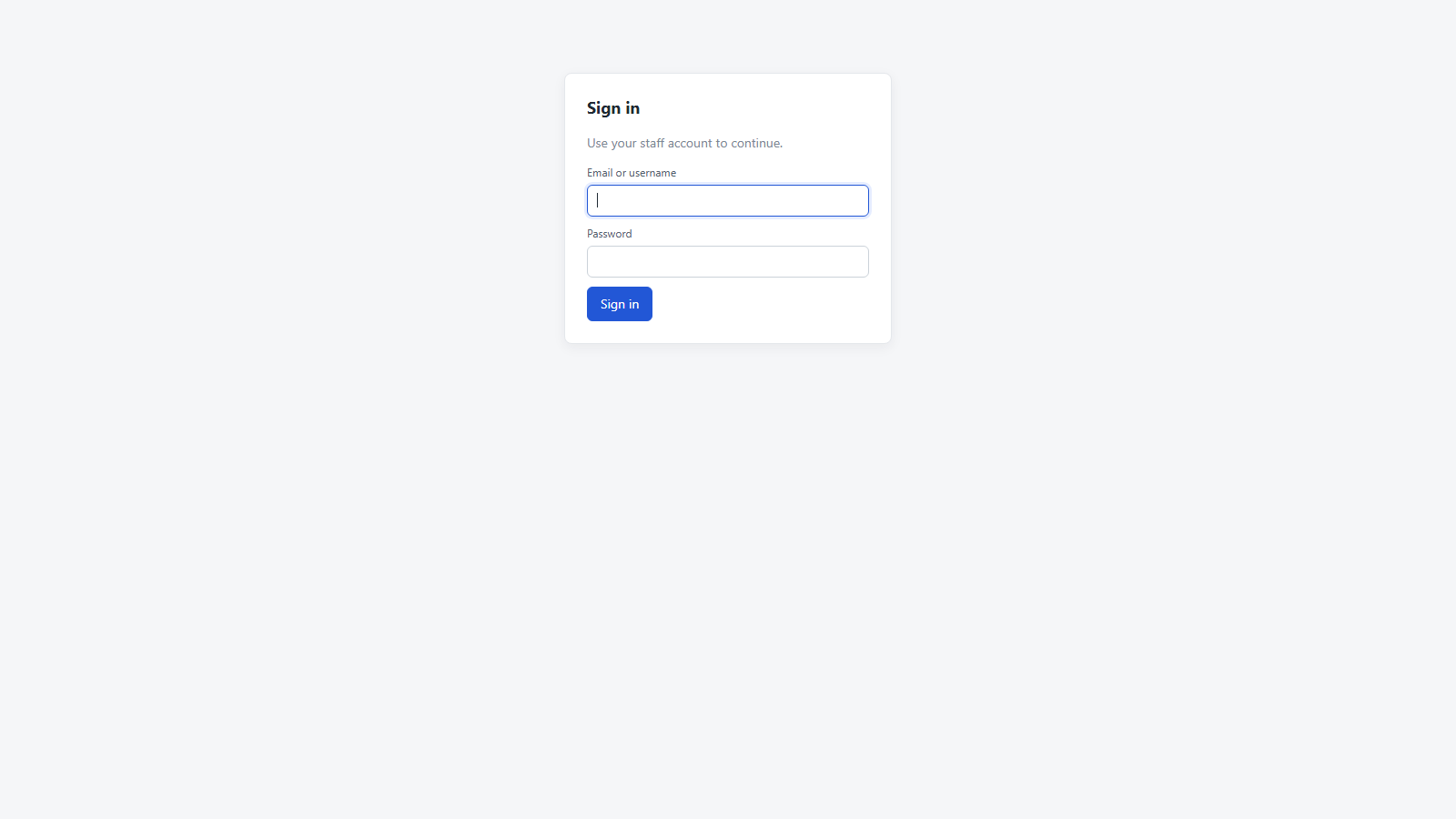
Login. Staff sign-in supports email or username + password. Failed logins are rate-limited per IP server-side.
Visitor page. Standalone branded chat at /p/default. Header colour, welcome heading, contact-form copy, and Start-chat button colour all come from per-project settings.
Another project, same backend. The same code path renders a different brand. Slug /p/rahul uses its own branding entirely.
Embeddable widget. The same chat behaviour delivered as a bubble + popup panel that any third-party site can embed with a one-line script tag.
Admin overview. Total chats by status, lead-stage breakdown, and a live agents-online grid with each agent's current load.
Admin chats. All conversations in one paginated table with status / lead-stage / agent / date filters and full-text search.
Ready to deploy?
OnlineChatCRM ships as a self-contained .NET application — drop on Plesk / IIS,
fill in your DB connection string and admin credentials, and you're live in under an hour.